
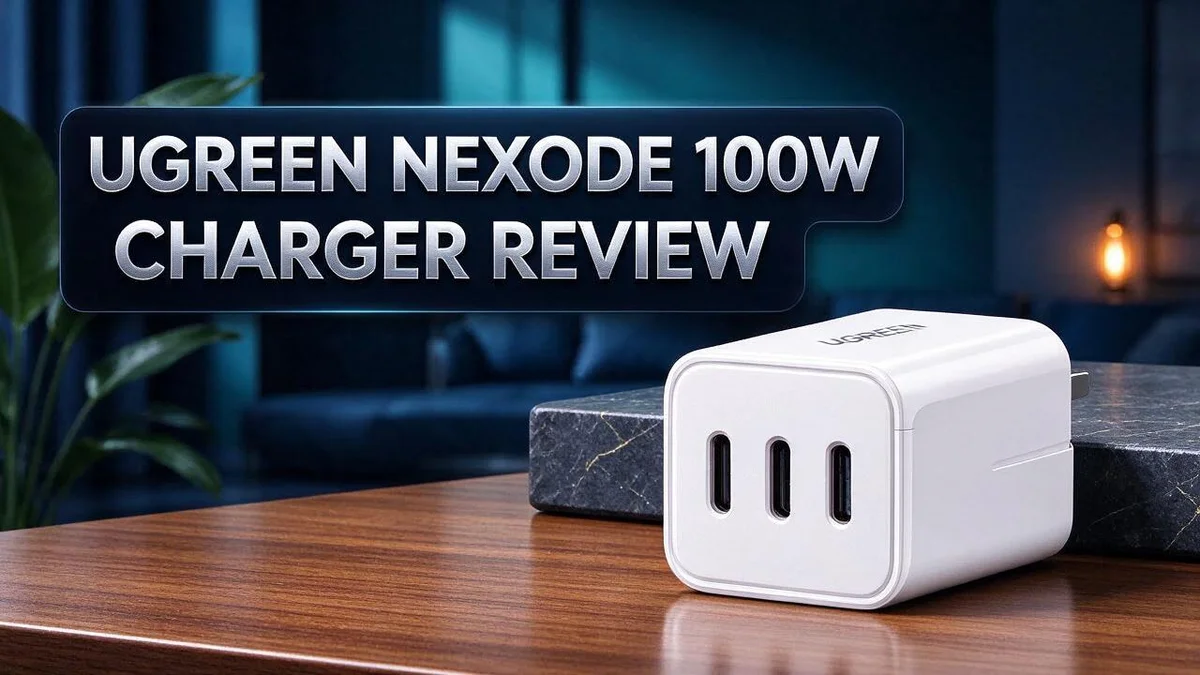
UGREEN Nexode 100W Charger Review: Fast Multi-Port GaN Charging Tested
Your phone, laptop, and tablet all need power at the same time. One wall outlet rarely has room for every charger. The UGREEN Nexode 100W Charger fixes this with one compact GaN brick. It offers four ports: three USB C and one USB A.
The charger shares up to 100W across all ports. You can charge several devices at once and still get fast speeds.
Reviewers describe it as good looking and fast. Many users also compare it with the Anker Prime charger.This review covers its specs, strengths, and top rivals. Let’s see if it deserves a spot in your bag.
In a Nutshell
- Port layout: The charger offers three USB C ports and one USB A port. You can power four devices at the same time.
- Protocol support: A related 2 port UGREEN GaN X model lists PD 3.0, PD 2.0, QC 4.0+, QC 3.0, and PPS. These cover many phones, tablets, and laptops.
- Dual port option: The 2 port version gives its first two ports up to 100W each. The combined output stays at 100W maximum.
- Main strengths: Reviewers praise the fast charging and the multi device support. They also like the clean look of the Nexode line.
- Possible drawbacks: The research names no clear cons. Power is shared, so each port may deliver less when you plug in several devices.
- Top rivals: The Anker Prime charger is the main named competitor. Many generic 100W GaN chargers also compete in this space.
Key Features and Port Layout

Last update on 2026-11-11 / Affiliate links / Images from Amazon Product Advertising API Some of the links on this website are affiliate links, which means that at no additional cost to you, I earn a commission if you click through and make a purchase. I only recommend products and services that I believe will add value to my readers. Thank you for your support!
Start by matching each device to a port. Most modern gadgets use USB C, so the three USB C ports will do most of the work. The single USB A port suits older devices that still use the classic rectangular plug.
Plan your cables before you plug in. A USB C to USB C cable works best for fast charging on phones and laptops. Your cable matters as much as the brick itself, so check its rating before you reuse an old one.
Watch how power shifts between ports. When you connect several devices, each one gets a share of the total. When your laptop finishes charging, more power flows to your phone. This makes the setup feel flexible during busy mornings.
Use one brick for a tidy desk. One charger can replace several wall adapters. Fewer cords mean less clutter on your nightstand or desk. Place it where air can move around it so it stays cool. Keep cords neatly bundled too.
Think about travel too. Hotel rooms often have limited outlets. One outlet can power a full set of gadgets with this layout. That saves space in your bag and keeps your room tidy.
Check what each device needs. Some phones accept less than the full output. They draw only what they need, so the charger never forces extra power. Power follows the device, not the port label.
Keep the cable count low. A single brick and four ports cut down on spare chargers. You carry less weight and fewer parts. That makes it easier to pack for a weekend trip or a long workday. Simple habits like this keep charging smooth.
Design, Size and Build Quality
Think about where the brick will sit. A four port charger takes up more room than a basic phone adapter. Pick a spot on your desk or nightstand where it can stay put.
The research does not list exact dimensions or weight. Check the official listing for measurements before you buy. This step helps you confirm that the charger fits your bag, drawer, or travel pouch.
Weight plays a role in daily use. A light brick slides easily into a backpack. A heavier one feels more solid on a desk and resists tipping when you pull a cable.
GaN technology gives this design an edge in heat control. Gallium nitride chips generally run cooler than older silicon parts. Cooler parts often mean a longer working life for the charger.
Good airflow matters too. Vents or open edges help heat escape during heavy use. Set the charger on a hard surface rather than under papers or a soft blanket.
Port spacing deserves a close look. Ports set close together can block larger plugs. Give your cables room to bend so they do not strain the connectors.
Build quality shows in the small details. Look for a firm shell, snug port fits, and a stable base. A loose port can wear down a cable over time.
Finish and surface also affect how the charger handles daily wear. Matte or textured surfaces hide fingerprints and scuffs better than glossy ones. This keeps the charger looking neat over time.
Keep the cable path clear. Route your cables behind the desk so they stay out of sight. A tidy setup makes the charger easier to reach and unplug.
Charging Speed and Power Distribution
Charging speed often decides whether a gadget is ready when you need it. This section explains how the UGREEN Nexode 100W charger shares its power. Understanding that split helps you plan every charging session.
The 100W total is a shared pool. The charger does not give every port full power at once. Instead, it divides the output based on what each device asks for.
Your device sets the pace. A phone that accepts 30W will not pull 100W, even from a strong port. The charger matches the power level that each device can handle.
Think of it like water in a pipe. Each device takes what it needs from the same flow. When one device finishes charging, the rest can receive a larger share.
Charging order can change results. Connecting high demand devices first gives you a clear view of how the power moves. Then add smaller devices and watch the changes as they join.
Cable quality also matters. A weak cable can limit speed even when the charger has power to spare. Choose a cable rated for the wattage you need, especially for laptops.
Power use changes during charging. Batteries accept power quickly at first. Speed usually drops as the battery fills up. This is normal for most devices, not a flaw in the charger.
Smart planning saves time. Pair big devices with fewer small ones so the total stays comfortable. This keeps every device moving without extra waiting.
The research does not give exact split numbers for each port. Use the 100W total as a guide, not a fixed promise. Real results depend on your devices, cables, and battery levels.
Top 3 Alternatives
Anker Prime Charger

Last update on 2026-11-23 / Affiliate links / Images from Amazon Product Advertising API Some of the links on this website are affiliate links, which means that at no additional cost to you, I earn a commission if you click through and make a purchase. I only recommend products and services that I believe will add value to my readers. Thank you for your support!
If you want high power in a small body, this charger fits the bill. It offers several ports, so you can charge a laptop, phone, and tablet at the same time.
Its GaN design keeps the charger cool during long charging sessions. Travelers also appreciate how easily it slides into a backpack or carry-on bag.
Baseus GaN5 Pro


Last update on 2026-11-11 / Affiliate links / Images from Amazon Product Advertising API Some of the links on this website are affiliate links, which means that at no additional cost to you, I earn a commission if you click through and make a purchase. I only recommend products and services that I believe will add value to my readers. Thank you for your support!
The Baseus GaN5 Pro suits people who want fast charging without fuss. It supports common fast charging standards, so most phones and tablets charge quickly.
Its slim shape slips into a pocket or small pouch. Many users like the clear output labels on the front, which make it simple to pick the right port for each device.
Anker 737 Charger

Last update on 2026-11-11 / Affiliate links / Images from Amazon Product Advertising API Some of the links on this website are affiliate links, which means that at no additional cost to you, I earn a commission if you click through and make a purchase. I only recommend products and services that I believe will add value to my readers. Thank you for your support!
The Anker 737 Charger delivers strong wattage for demanding laptops. One charger can power a laptop and a phone without swapping cables.
Dual ports give you room to charge two devices at once. Pick this option if you want maximum power from a trusted brand that many people already know and use daily.
Protocol Support and Device Compatibility
Protocols decide how fast a device charges. Chargers and devices share a common language called a protocol.
The UGREEN GaN X 100W model lists PD 3.0, PD 2.0, QC 4.0, QC 3.0, QC 2.0, and PPS. The research does not confirm the full list for the four port version.
So check the product listing first. Look for the exact protocol names before you plan your setup.
PD stands for Power Delivery. Most iPhones, iPads, and MacBooks use this standard. Many recent Android phones use it too.
PPS is a flexible form of PD. Many Samsung phones use PPS for fast charging. It lets the device adjust voltage as the battery fills.
QC stands for Quick Charge. Qualcomm created this standard for Android phones and tablets. A QC device may charge slowly from a port that lacks QC support.
Matching happens in both directions. Your device requests a power level. The charger offers what it can give. If they share no protocol, the device falls back to basic 5V charging.
Laptops add another layer. They often request specific voltage profiles over PD. A charger that offers several profiles lets the laptop pick the best one.
The USB A port suits older gadgets. Many of these devices use basic charging rates. It works well for earbuds, fitness trackers, and small accessories.
Look up your device spec sheet. Search for the model name with the words “supported charging.” The result shows the protocols your phone or laptop accepts. Then you can choose the right port with confidence.
A few minutes of research saves frustration. You avoid slow charging and wasted time. Your gadgets stay ready for the day.
Heat Management and Safety Features
Heat builds up fast when four ports run at once. Check how the charger feels during long sessions, since heat is the main sign of stress.
A warm surface is normal. A surface that is too hot to hold for a few seconds is a warning sign. Unplug the charger and let it cool down before you use it again.
Avoid covering the charger with a pillow, blanket, or pile of papers. Trapped heat has nowhere to go, so the unit will run hotter.
Room temperature matters more than many people think. A charger left in a hot car or on a sunny windowsill works harder. Keep it in a cool, dry spot.
Dust and lint can block the vents over time. Wipe the outer shell with a dry cloth every few weeks. Never use liquids or harsh cleaners.
Safety starts with the basics. Check the plug, case, and cable for cracks or bulges. Stop using the charger if you smell burning or see dark scorch marks.
Only plug the charger into outlets that match its rating. Avoid cheap extension cords that can overload. An overloaded outlet can overheat quickly.
Watch for unusual sounds too. A faint hum can be normal, but a loud crackle or popping noise is not. Unplug the unit right away if you hear it.
Good habits protect both the charger and your devices. A cool, clean, and undamaged unit keeps charging steady for years. Replace the charger if it stops working well or shows any damage.
Value for Money
Getting the most from this charger starts with what it replaces. Instead of carrying several separate bricks, you can power your phone, tablet, laptop, and earbuds from one unit. This saves space, time, and effort every day.
Fewer outlets, less clutter. Four ports mean fewer wall sockets in use. This helps a lot on a crowded desk or in a hotel room with limited outlets.
Built for busy households. Families often charge many devices each night. One block handles that routine without extra adapters, so everyone can plug in at once.
Travel becomes simpler. Packing one charger leaves more room in your bag. Fewer chargers also means fewer items to lose at the airport or the café.
Fewer things to manage. One charger means one set of cables to organize. You also remember one item before you leave home.
Easy comparisons. Shoppers often compare this model with the Anker Prime charger. Many generic 100W GaN listings also exist. Look at the number of ports and the shared output first, then compare design and size side by side.
A fair look at the trade off. Your real benefit depends on your daily habits. If you only charge one phone, a smaller unit may suit you better. Choose the setup that fits your routine.
Positive feedback adds confidence. One reviewer praised the look and speed of a Nexode Pro model. That kind of feedback helps buyers feel sure about their choice.
The bottom line. This charger suits people who juggle many devices every day. If all four ports stay busy, the setup earns its spot on your desk.
Pros and Cons
Pros
– Charges a phone, tablet, and earbuds at the same time
– Gives a laptop strong speed while other devices charge
– Looks good on a desk and fits a modern setup
– Acts as one central hub for everyday gear
– Uses GaN technology to deliver 100W from a compact unit
Cons
– The 100W total splits across ports, so charging slows when all ports run
– Full speed needs a cable rated for high wattage
– Few independent reviews are available for long term results
– Research shows no stated drawbacks, so test it in your own setup
Who Should Buy It
This charger suits people who own a lot of gadgets. Many homes have phones, tablets, smartwatches, and laptops that all need power. One unit can handle that mix without much fuss.
Couples sharing a bedside table will find it handy. Two people can plug in their phones at the same time. Nobody has to wait for a turn at the only outlet.
Students in shared dorm rooms can benefit too. Desk space often feels tight in small rooms. A compact charger leaves more room for books, notes, and snacks.
Gift shoppers may also find it useful. Tech fans often enjoy a gift that feels modern. This charger offers a clean look and quick charging for busy people.
Remote workers often juggle many gadgets during the day. Their setup may include a laptop, phone, headset, and tablet. One charger keeps those items topped up.
People who charge just one device may not need it. Someone who charges only one phone each night gets little benefit from four ports. A simpler charger may fit their daily routine better.
Owners of older accessories should plan ahead. The single older style port works with many older items. Older gear may still charge slowly, so check each device first.
Start by counting your devices each night. Write down how many gadgets charge together most evenings. This quick check shows whether the extra ports will truly help you.
In short, this charger fits busy homes full of gadgets best. Light users can stick with a smaller option. Heavy users will likely appreciate having one place for everything.
Final Verdict
The UGREEN Nexode 100W Charger earns a strong recommendation from me. It does its main job well and keeps your charging setup simple.
Speed, size, and flexibility are its best qualities. The available research points to a fast, good looking charger that handles several devices at once.
Think of it as a power hub for your daily routine. You plug it in once and let it handle the rest.
Who Should Buy It
Buy it if you want one dependable charger for your desk, nightstand, or travel bag. It fits people who want less fuss and fewer adapters.
It also suits anyone who owns a USB C laptop and wants one brick to power it.
What To Check First
Look at your devices before you order. Add up how much power each one needs.
Then match that total against the charger’s limit. This quick check helps you avoid surprises later.
Good habits help too. Use quality cables, and keep the charger in a spot with airflow.
My Final Take
The research lists no stated drawbacks, which is a good sign. Still, limited reviews mean you should watch how it performs in your first weeks.
Test it with your own gear. If every device charges as you expect, you have found a keeper.
For most buyers, this charger delivers what it promises. It offers fast charging, a clean look, and room for several gadgets.
My verdict: a smart pick for anyone ready to simplify their charging routine. Choose it if your devices match its strengths, and enjoy a tidier setup.
Frequently Asked Questions
How many devices can I charge at once?
The charger has four ports, with three USB C ports and one USB A port. You can power several gadgets at the same time. Check how much power each device needs before you plug everything in.
Is it a better pick than an Anker Prime charger?
A user comparison names the Anker Prime charger as a close rival. Both chargers aim for fast charging. Look at the port count, the size, and the devices you plan to power. Then choose the option that fits your daily setup.
Which charging standards does it support?
A related UGREEN GaN X 100W model lists PD 3.0, PD 2.0, QC 4.0 down to QC 2.0, and PPS. These standards help phones and laptops find the right charging speed. Check the product details to confirm which standards this model supports.
Are there other 100W chargers to consider?
Yes, many generic 100W GaN chargers and multiport 100W USB C listings exist. Many of these listings do not name a brand, so read the details carefully. Look for the total output, the number of ports, and the supported standards. This helps you compare options fairly.

Hi, I’m Marie Bennett, the founder of PackSmart.blog.
I write about travel essentials and Amazon gear reviews to help you pack smarter and travel lighter.
From must-have accessories to space-saving gadgets, I test and share what truly works on the road.
My mission is to make every trip stress-free and organized for travelers like you.
Join me as I explore smarter ways to travel—one bag at a time.