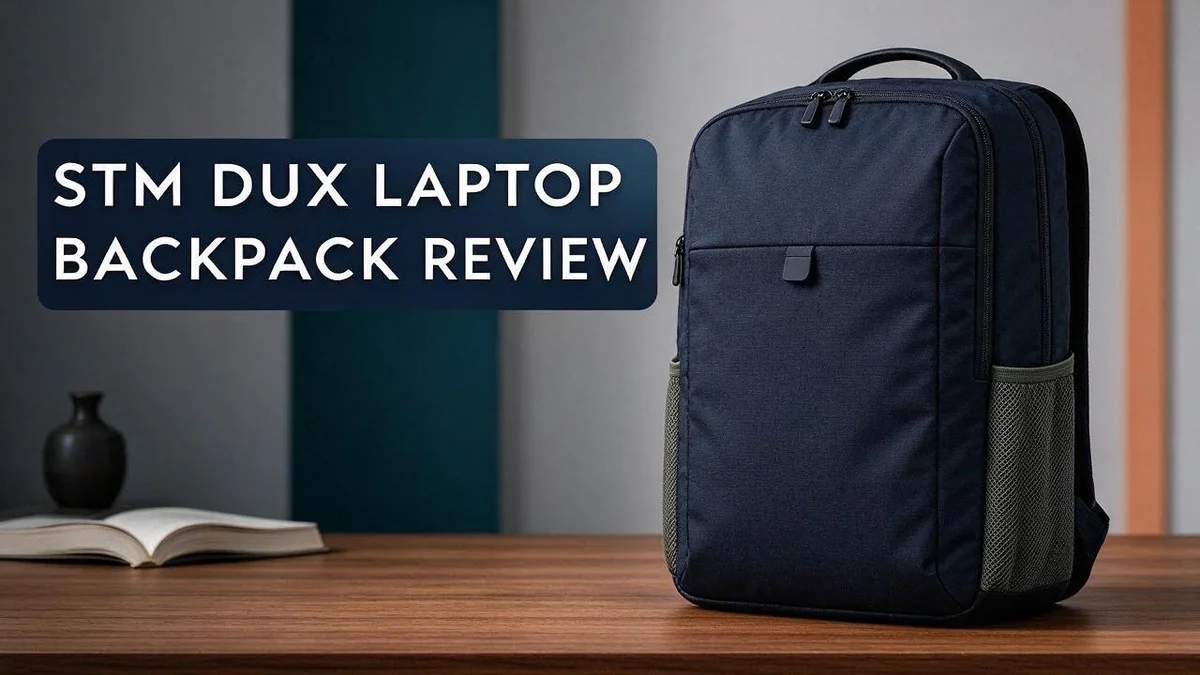
STM Dux Laptop Backpack Review: Protection, Space and Comfort Tested
Your laptop deserves better than a thin sleeve and a prayer. The STM Dux Laptop Backpack aims to give it real protection every day.
This pack holds 30 liters of gear. It fits laptops up to 16 or 17 inches, though listings vary. You also get room for a tablet, documents, and accessories.
STM adds 360 degree Mil Spec padding around your device. A soft lined sleeve and reinforced edges cushion it from bumps and drops.
In this review, we look at the design, storage, comfort, and protection. We also compare the Dux with other popular bags. Let’s see if it fits your daily routine.
In a Nutshell
-
Best for: Students, commuters, and office workers who carry a laptop every day and want a secure, cushioned spot for it.
-
Size and weight: The pack measures 20 x 13 x 9.5 inches and weighs about 3.92 lb. It feels sizable but stays manageable on your shoulders.
-
Laptop fit: The soft lined sleeve holds laptops up to 16 or 17 inches. Listings vary, so check your exact model before you buy.
-
Extra protection: Reinforced edges help guard the pack against bumps. The Dux Ultra version adds a magnetic cover for another layer of security.
-
Organization: Several pockets keep tablets, documents, and small accessories in order. Users also say the pack feels comfortable on the back.
-
Color and competition: You can pick Black, Blue, or Grey. Rivals include the HP Prelude Topload and the COACH Signature Charter Backpack, but the Dux stands out for its protective focus.
Design, Build and Available Colors

Last update on 2026-10-31 / Affiliate links / Images from Amazon Product Advertising API Some of the links on this website are affiliate links, which means that at no additional cost to you, I earn a commission if you click through and make a purchase. I only recommend products and services that I believe will add value to my readers. Thank you for your support!
Design is where the STM Dux makes its first impression. The bag looks clean and simple, so it suits school, work, and travel alike.
The Dux Ultra adds a magnetic cover. This flap closes with a magnet, which means less fumbling with zips when you rush through a crowded station.
Think about which version fits your routine. The standard model covers most daily needs, while the Ultra suits people who want a quicker, tidier closure.
The build feels solid from top to bottom. Seams and edges look neat, and the pack keeps its shape well when packed full.
Color choice says a lot about your style. Black offers a sleek, professional look that works in almost any meeting room.
Blue adds a touch of personality to a plain commute. Grey feels calm and neutral, so it pairs well with any outfit.
Your choice should reflect how you move through your day. A bold shade suits creative folks, while a dark shade fits formal settings.
Darker shades like black tend to hide everyday dust and scuffs better. That makes a black pack look fresh for longer.
Comfort matters just as much as looks. One user shared that the bag feels comfortable on the back, which helps during long walks to class or work.
Travelers will also value how steady the pack feels on crowded buses or busy airport lines.
Overall, the design balances style with practical features that matter every day. Pick the version and color that match your daily routine, and the bag becomes a reliable companion.
Laptop Protection and Padding
A laptop can take a hard hit in seconds. That is why padding matters so much. The Dux focuses on keeping your machine safe from everyday knocks. Even a short fall can cause lasting harm.
Padding does more than block bumps. It also eases the small shakes that happen on busy trains and crowded buses. Good cushioning keeps your device steadier throughout the day.
Movement causes a lot of damage. A snug fit stops the laptop from sliding and hitting the sides. Less movement means less risk of cracks or dents.
Daily handling creates many chances for slips. You pull the laptop out in cafés and slide it back in on crowded platforms. Each move carries a small risk of a drop.
The Dux suits people who carry a laptop every day. If you work in several places, the padding gives steady protection. You can focus on your work instead of worrying about every bump.
Peace of mind matters on long days. Your bag can sit under a desk or lean against a wall. The padding helps your laptop handle those moments with less stress.
Protection also depends on how you care for the bag. Keep the pack zipped and avoid overloading it. A stuffed bag puts strain on the sleeve and the seams.
Think about your own habits. If you ride a bike or walk through rain, extra care helps. The padding does its job, but small habits make the biggest difference.
A good sleeve is only part of the picture. Pair it with careful packing and the Dux gives your laptop a safer ride. Your device deserves that kind of attention every day.
Capacity, Size and Laptop Fit
The STM Dux holds about 30 liters of gear. That capacity suits a full workday. You can carry a laptop, charger, lunch, and a water bottle without feeling squeezed.
Start with your daily load. Most commuters carry a laptop, a notebook, and a few cables. The 30 liter space handles that easily.
Heavy days with binders still fit. Avoid overstuffing, since tight packing can strain the zips and seams.
Measure your laptop before you buy. Listings mention 16 or 17 inch support, but the real fit depends on your device. Measure the width, depth, and thickness, then compare those numbers with the sleeve space.
A thick gaming laptop or a large power brick can feel snug. Slim ultrabooks usually sit with room to spare.
Plan for accessories. Chargers, a mouse, and cables need space beside the laptop. The main compartment keeps these items within easy reach.
Many travelers use the pack as a personal item. Airline rules vary, so measure your bag before you fly.
Balance the weight. Place heavier items close to your back and keep the laptop in the padded sleeve. This layout eases pressure on your shoulders.
Think about your typical day. Students may need room for textbooks, while office workers may only need a laptop and files. The extra space helps when plans change.
For a slimmer setup, you can leave the outer pockets empty. This keeps the bag flatter and lighter to carry.
Metric buyers can also check the size. The pack measures about 50.8 by 33 by 24.1 centimeters, which helps when you compare it with a seat or overhead bin.
Fit matters more than size numbers. Try the bag with your usual items before a long trip. Comfort and capacity work together, so test both.
Top 3 Alternatives
Peak Design Everyday Backpack

Last update on 2026-11-06 / Affiliate links / Images from Amazon Product Advertising API Some of the links on this website are affiliate links, which means that at no additional cost to you, I earn a commission if you click through and make a purchase. I only recommend products and services that I believe will add value to my readers. Thank you for your support!
Looking for a sleek and smart pack? The Peak Design Everyday Backpack gives you a clean look with plenty of room.
Its magnetic side pockets and adjustable dividers keep your gear neat. Many people love how it carries well on long commutes.
The main compartment fits a fifteen inch laptop. A weather resistant shell keeps your items dry on rainy days.
Osprey Farpoint Backpack


Last update on 2026-11-02 / Affiliate links / Images from Amazon Product Advertising API Some of the links on this website are affiliate links, which means that at no additional cost to you, I earn a commission if you click through and make a purchase. I only recommend products and services that I believe will add value to my readers. Thank you for your support!
Want a pack built for travel? The Osprey Farpoint Backpack offers a smart mix of comfort and function.
Its padded laptop sleeve protects your device during busy trips. The zippered front panel lets you grab items fast.
The pack opens wide, so you can pack and unpack with ease. Its removable daypack clips onto the main bag for short outings.
Tortuga Setout Backpack
No products found.
Need a bag for work, school, or weekend trips? The Tortuga Setout Backpack brings a bold and simple style.
Its sturdy construction handles daily wear with ease. The water resistant material also helps in light rain.
Inside, you find a padded laptop compartment and organized pockets. Many travelers like how the bag stays slim yet holds plenty of gear.
Pockets and Organization
Good organization saves time every morning. The STM Dux offers multiple pockets, so you can sort your gear without digging. Each item gets its own spot.
Small items need their own zone. Pens, keys, and earbuds can slip to the bottom of a bag fast. Put them in a dedicated pocket near the top. You can grab them in seconds.
Cables are another common problem. Chargers and cords tend to tangle. Wrap them in a small pouch and place it in a side pocket. This keeps your bag neat and your cords easy to find.
Outer pockets suit items you grab often. A phone or sunglasses stay within reach. Quick access means fewer stops on busy streets.
Think about the order of your pockets. Store things you use often in front pockets. Keep items you need less often deeper inside. This habit keeps your flow smooth.
Documents also need care. Folded papers bend and wrinkle when they sit loose. Slide flat folders into an open compartment instead. Your notes stay crisp and easy to read.
Sort by daily routine. Commuters might keep a badge and transit card in the front. Students could separate notebooks from tablets.
Office workers may want a pocket for a mouse. Each person builds a system that fits their day and their habits.
Check your system each week. Remove old receipts and empty wrappers. A quick clean keeps the pockets useful. Many people find that a clear layout reduces stress before meetings and classes.
Comfort and Carrying Experience
The STM Dux feels light enough for daily use. It weighs 3.92 lb, or 1.78 kg, so the empty pack does not drag you down before you add anything inside.
Comfort matters most after hours on your feet. Many users say the pack feels comfortable on the back. That feeling can make a long commute or a full day of classes far less tiring.
Your total load shapes the experience. A heavy laptop, chargers, and a few books can pull hard on your shoulders. The bag feels different when it is packed full than when it carries only a light notebook.
Try it on before you commit. Stand up with the bag loaded the way you normally carry it. Walk for a few minutes and notice any pressure points. This simple test shows how the pack sits on your frame.
Shoulder fit varies from person to person. Taller users may find the pack sits differently than shorter users do. Adjust the straps until the weight feels balanced and does not rest heavily on one side.
Warm weather can change how any backpack feels. Long walks on hot days add sweat and extra strain. Take short breaks when you can, and shift the bag when your shoulders start to ache.
Comfort also affects how often you carry your gear. A pack that feels good gets used every day, and that is the real win for commuters, students, and office workers alike.
Dux vs. Dux Ultra: Which Version to Choose
The main difference is the magnetic cover. The Dux Ultra includes one, but the standard Dux does not.
Ask yourself how often you open your bag.
A magnetic closure keeps the flap in place without fuss. Frequent access may make that detail feel useful during busy mornings.
Think about your daily stops.
Some people ride transit and reach for items many times a day. Others only open their bag at a desk.
The Ultra may suit the first group. The standard model may suit the second.
Compare the protection features.
Both versions share a protective laptop sleeve and reinforced edges. The Ultra adds the magnetic cover on top of those features.
If your gear faces rough trips, that extra layer may bring peace of mind.
Check the colors you like.
The STM Dux comes in black, blue, and grey. Look at the product listing for the Ultra to confirm its available shades.
Pick a color that fits your work style and wardrobe.
Read the listing carefully.
Model names can look similar online. Confirm you select the exact version before you order.
Look at the photos to spot the magnetic flap.
Consider the competition too.
Shoppers often compare the STM Dux with the HP Prelude Topload Laptop Bag or the COACH Signature Charter Backpack. Each option has a different style.
Your needs should guide the final choice.
Our simple take: Choose the standard Dux if you want a clean, familiar design. Choose the Dux Ultra if the magnetic cover matters to you.
Either version gives you the same roomy main compartment.
Pros and Cons
Pros
- Soft lining cushions your laptop inside a dedicated compartment.
- Reinforced edges help the bag handle bumps and knocks.
- The 30 liter space fits tablets, paperwork, and accessories.
- Padding wraps the bag for extra protection on the go.
Cons
- Laptop size fit varies by listing, so check your device size first.
- The research lists no stated drawbacks, so long term feedback is limited.
- Only one user comfort review appears, which gives a narrow view.
- At 20 inches long, it may feel large in tight spaces like overhead bins.
Who Should Buy It
This pack suits people who carry a laptop almost every day. It fits office workers, students, and frequent travelers who want one bag for everything.
Commuters who rely on public transport often need a bag that stays steady. The structured shape keeps gear upright on crowded trains and buses.
Students with packed schedules can benefit too. Pockets help separate class notes, charging cables, and water bottles, so nothing sinks to the bottom.
Remote workers who move between spaces may like the simple layout. One bag can carry work from a home desk to a café or coworking space.
Frequent flyers and business travelers may find it handy for short trips. It carries a laptop and a few days of documents, but it may not replace a full suitcase.
Anyone who values an organized layout will enjoy the pocket setup. Multiple compartments make it easier to find chargers, pens, and cards quickly.
People who prefer a clean look also tend to like this design. Its understated style works in offices, classrooms, and casual settings alike.
Shoppers who switch bags often may also find it a practical pick. It works as a steady everyday option rather than a special occasion bag.
Who should look elsewhere? Anyone who needs a very large bag for camping or heavy gear should consider other options. People who carry a 17 inch machine daily should double check the fit first.
Buyers who need fully waterproof protection may want to explore other choices. The research does not confirm waterproof materials, so plan for rain protection separately.
If you fit one of these groups, this bag deserves a closer look. Read the sizing details, then decide if it fits your daily routine.
Final Verdict
The STM Dux is a strong pick for daily laptop carriers. It keeps its focus on protection, space, and order.
Those three goals matter most in a work bag. The Dux meets them with a clean, simple design.
Its best quality is everyday confidence. You can set the bag on a desk or a train seat without much worry.
The pack also stays practical. You get room for a full workday and a layout that keeps small items easy to find.
At 3.92 pounds empty, it carries some weight of its own. That is normal for a padded pack, but light packers should take note.
Other bags take a different path. The HP Prelude Topload suits people who like a classic carry style. The COACH Signature Charter Backpack leans toward fashion. The Charles Italian Leather Laptop Bag fits a formal office look.
The Dux sits in the middle. It blends everyday function with a neat, modern style.
Keep one point in mind. The research offers limited feedback, so test the bag soon after it arrives. Load your daily gear and check how it feels on your back.
Our overall take is positive. The STM Dux earns a recommendation for students, commuters, and remote workers who want a safe, organized way to carry a laptop.
If that sounds like your routine, the Dux deserves a spot on your shortlist. Check the details, choose your version, and carry your tech with ease.
Frequently Asked Questions
Which version should I choose, the standard Dux or the Dux Ultra?
The standard Dux offers the core padding and reinforced edges. The Dux Ultra adds a magnetic cover for extra closure. Pick the Ultra if you want that extra layer.
How does the Dux compare with the HP Prelude Topload bag?
The HP Prelude Topload is a top load bag, so you drop your laptop in from above. The Dux is a backpack, so it spreads weight across your back. Choose the Dux if you walk or ride a lot. Choose the HP if you prefer a simple sleeve style.
Is the Dux a good match for a dressier office look?
The COACH Signature Charter Backpack and the Charles Italian Leather Laptop Bag lean toward polished styles. The Dux fits casual and mixed dress codes better. It works well when you want a practical bag that still looks clean.
Does the Dux come with a warranty?
The research does not mention warranty details. Check the seller page before you buy to confirm the coverage and return options.

Hi, I’m Marie Bennett, the founder of PackSmart.blog.
I write about travel essentials and Amazon gear reviews to help you pack smarter and travel lighter.
From must-have accessories to space-saving gadgets, I test and share what truly works on the road.
My mission is to make every trip stress-free and organized for travelers like you.
Join me as I explore smarter ways to travel—one bag at a time.