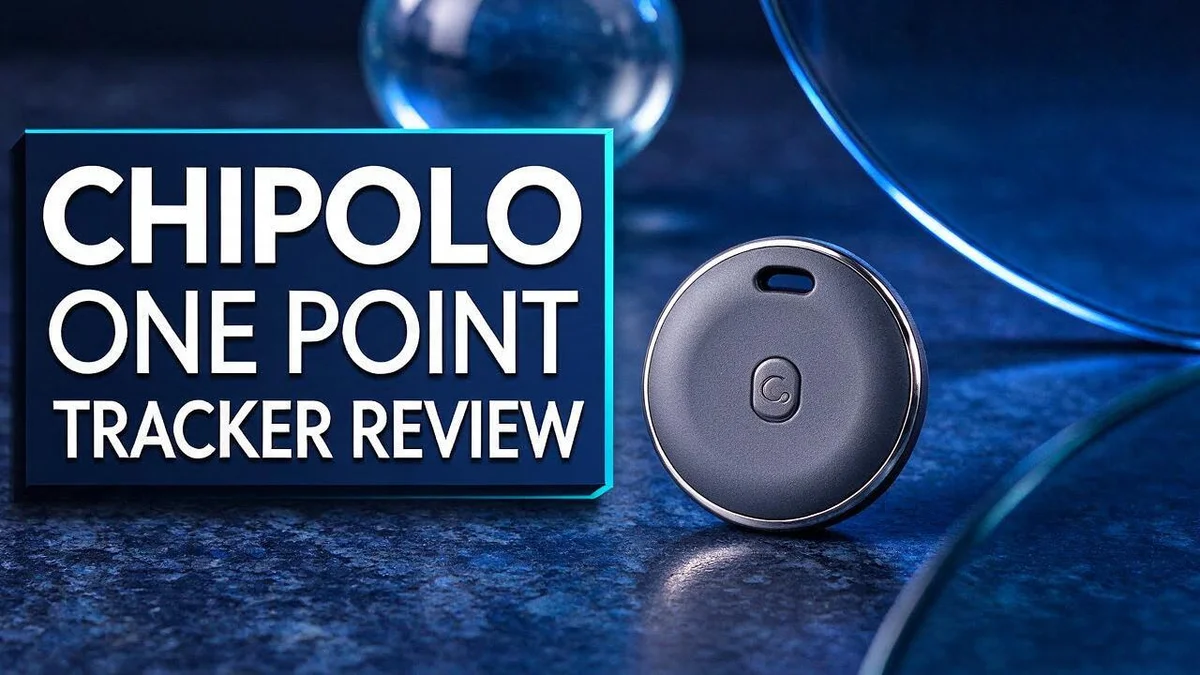
Chipolo ONE Point Tracker Review: Is It a Good Tracker?
Lost keys can ruin your morning. A good tracker fixes that fast. The Chipolo ONE Point Tracker aims to help you find your things with ease.
This tracker works with Google’s Find My Device network. Nearby Android phones pick up its Bluetooth signal. They relay the location to you anonymously.
The battery lasts about one year, and you can replace it. One user calls it a clear upgrade over Tile trackers.
In a Nutshell
- Best for Android users: This tracker fits people who carry an Android phone or tablet. iPhone owners should look at the Chipolo ONE Spot instead.
- Privacy: Location updates travel through anonymous Bluetooth connections. Nearby Android devices pass along the signal without revealing who they are.
- Real user feedback: One reviewer calls it a clear upgrade over Tile trackers. That praise makes it a strong pick for current Tile owners.
- Update speed: Location refreshes somewhat frequently, but mostly when an Android phone is close by. Crowded places work best.
- Drawbacks: Our research found no specific flaws in the tracker itself. Coverage in quiet areas remains the main limit.
- Other options: Shoppers can also compare the Chipolo POP, the Chipolo Card Point, and the Ugreen Bluetooth Wallet Finder. Each suits a slightly different need.
Key Features and Find My Device Network Support

Last update on 2026-11-17 / Affiliate links / Images from Amazon Product Advertising API Some of the links on this website are affiliate links, which means that at no additional cost to you, I earn a commission if you click through and make a purchase. I only recommend products and services that I believe will add value to my readers. Thank you for your support!
Google’s Find My Device network does most of the heavy lifting. Nearby Android phones pick up the tracker’s Bluetooth signal. Then they send its location back to the owner.
Your own phone does not need to be close by for the tracker to be found. Any Android device on the network can help. That makes the system feel like a shared search party.
Why the network matters: Coverage depends on how many Android devices pass by. A busy city street may offer more chances than a quiet farm road. Keep this in mind when you decide where you leave your keys.
Key features to check include:
- A Bluetooth connection that links the tracker to nearby phones
- Location updates shown inside the Find My Device app
- No cellular plan needed because the tracker relies on Bluetooth
Attach the tracker to a keyring, bag strap, or wallet. Choose a spot where the item sits most of the day. A secure attachment helps the tracker stay with the thing you lose most often.
When you open the app, check the map view. It shows the last reported spot. That detail helps you retrace your steps quickly.
Overall, the key features focus on simplicity. The tracker connects to a network that many Android owners already use. Good habits make that network work better for you. Keep the tracker on items you carry every day, and you will have a stronger chance of finding them fast.
Design and Build
The design of this tracker focuses on simplicity. It is a small tag that fits easily into a pocket or bag. Good design matters because you will carry this tracker every day. A compact shape means less bulk on your keys. It also means less chance of it snagging on pockets or linings.
Sturdy materials are not listed in our research, so we cannot confirm how it handles drops or rain. Think about where you plan to use it. A tracker on a backpack zipper may need a different hold than one on a set of keys. Test the fit before you rely on it for daily use.
The look is clean and plain. Many people prefer this kind of understated style. It blends in with everyday items instead of drawing attention. This matters if you want to avoid theft risk from flashy gadgets.
Some buyers also care about sound. Our research does not mention a speaker, so do not count on a loud alert.
Tip for daily carry: Keep the tracker in the same spot each day. This habit helps you notice when it goes missing. It also helps you build a routine that protects your valuables.
Also consider how often you swap bags or coats. A tag can slip off a worn strap or get left in a jacket. Check the attachment every week so nothing gets lost. Pick a spot that feels secure. A loose tag can rattle or wear down over time.
Overall, the design fits a busy routine. It stays small, simple, and easy to carry. That is a smart pick for people who want a tracker they forget about until they need it.
Location Tracking Performance
Expect different results in different places. A busy city street often gives a fresh location faster than a quiet country road. Fewer nearby phones means fewer chances for an update.
The last seen spot matters most. When the tracker goes quiet, that final location becomes your starting point. Walk the nearby area slowly and check the map as you move.
Indoor spaces can be tricky. Thick walls and underground parking areas may block helpful signals. Check the app again after you step outside, since a newer report might appear.
iPhone owners may see less help. The network relies on Android phones to relay signals, so iPhone users likely get fewer nearby updates. Think about the phones in your household before you decide.
Run a quick test at home. Walk a few blocks away and open the app. This short check shows how the tracker behaves in your daily area, so you know what to expect before an item goes missing.
Timing changes the results too. Busy hours during the workday often bring more nearby phones. Late nights or quiet weekends may leave the tracker waiting longer for a fresh report.
Patience pays off in the search. Give the tracker a little time after a report appears. A second update often confirms the first and helps you trust the spot. Watch for patterns over a few days, too.
Pair the tracker with good habits. Keep it in the same place each day and check the app at the start of each day. Small routines make location tracking far more useful over time.
Top 3 Alternatives
Apple AirTag


Last update on 2026-10-27 / Affiliate links / Images from Amazon Product Advertising API Some of the links on this website are affiliate links, which means that at no additional cost to you, I earn a commission if you click through and make a purchase. I only recommend products and services that I believe will add value to my readers. Thank you for your support!
Apple AirTag works best for people who use an iPhone. It connects to the Find My network, so nearby Apple devices can help locate your item.
With newer iPhone models, the tag gives precise directions. Its battery is easy to replace, so the tag can stay useful for a long time.
Setup is quick and simple. Just open the Find My app and pair the tag with your phone.
Tile Mate

Last update on 2026-11-17 / Affiliate links / Images from Amazon Product Advertising API Some of the links on this website are affiliate links, which means that at no additional cost to you, I earn a commission if you click through and make a purchase. I only recommend products and services that I believe will add value to my readers. Thank you for your support!
Tile Mate is a good pick for people with both iPhone and Android phones. It uses Bluetooth to help you find keys, bags, or wallets nearby.
The Tile app lets you ring the tag from your phone. It also shows the last place your item was seen on a map.
It works well for everyday items. Many people place it inside a backpack or on a set of keys. Its small size fits easily in a wallet.
Samsung SmartTag2

Last update on 2026-11-17 / Affiliate links / Images from Amazon Product Advertising API Some of the links on this website are affiliate links, which means that at no additional cost to you, I earn a commission if you click through and make a purchase. I only recommend products and services that I believe will add value to my readers. Thank you for your support!
Samsung SmartTag2 fits best with Galaxy phones. It works with the SmartThings Find network to help locate lost items nearby.
Some models support Ultra Wideband for more precise searching. You can also press the tag button to make your phone ring.
It suits users who already own Samsung gear. The tag pairs well with a Galaxy phone, watch, or tablet. Choosing the right tag depends on your phone type.
Battery Life and Replacement
Battery life is one of the first things to check. The Chipolo ONE Point Tracker lasts about one year. That gives you a long run before any change is needed.
The battery is replaceable. You do not need to buy a whole new tracker when the power runs low. Replacing only the battery keeps your tracker in daily use.
Plan ahead for the swap. Set a calendar reminder for about eleven months after your first setup. This timing helps you act before the tracker stops sending updates. Many owners find this habit easy to follow.
Write the setup date on a sticky note or in your phone notes. This simple habit saves you from guessing how old the battery is. You can also check your reminder list every few months.
Why timing matters so much. A dead battery means no location updates. Your tracker cannot share its signal until the power returns. Acting early keeps your belongings protected.
Battery life can vary with use and setup, so treat one year as a guide rather than a promise. Check the tracker often during the first few months. If you notice it stops updating, replace the battery soon.
Read the instructions that come with your tracker before you open it. Each model has its own steps, so following the guide helps you avoid damage. Keep the small parts somewhere safe while you work.
If you buy a spare battery, store it in a dry drawer. Heat and moisture can shorten its life. Label the spare with the month you bought it, so you know when to use it. A small plan keeps your tracker ready for daily trips.
Privacy and Anonymous Bluetooth Connections
Privacy matters when a small tracker travels with you every day. The Chipolo ONE Point Tracker relies on anonymous Bluetooth connections. The research describes these links as anonymous, which means the signal does not announce who you are.
Think about the people nearby. A stranger’s phone may pass along a signal without any action from them. Many owners find that idea strange at first, so it helps to understand how it works.
Your own account stays the main lock. Find My Device is tied to a Google account. Use a strong password and turn on the extra sign in check. This keeps your location history safe from others.
Share with care. If you add family members to the account, they may see the tracker on a map. Review who has access every few months. Remove old devices you no longer use.
Check your phone settings too. Location services and Bluetooth should be set the way you like. Turning off a feature you do not need reduces the number of ways data can leave your phone.
Talk with your household. Shared bags and keys can confuse who owns the tracker. Label each device with a name. Agree on rules for when someone may check the map.
Watch for unknown devices. Many phones and apps can warn when a tracker travels with you but you do not own it. Keep alerts on so you know about unfamiliar trackers.
Keep your expectations honest. Privacy features cannot fix a lost item in an empty field. They only shape how the signal travels. Pair this knowledge with smart habits, like keeping the tracker in a bag you trust.
Ease of Setup and App Use
Setting up the Chipolo ONE Point Tracker feels quick and simple. Most people finish the pairing in just a few minutes.
Start by opening the app store on your phone. Search for the Chipolo app and install it. Then sign in with the account you want to use.
Next, press the button on the tracker. The app searches for it over Bluetooth. When the device appears on screen, tap it to connect. Keep the tracker close to your phone during this step.
Give each item a clear name. Names like “Backpack” or “House Keys” make searching easier later. You can also choose an icon, so the item stands out in your list.
The main screen shows each tracker as a simple card. A single tap opens the map and shows the last known spot. The layout stays clean, so people new to trackers rarely feel lost.
Turn on separation alerts in the settings menu. These alerts warn you when you walk away from an item. Pick a sound that you can hear easily in a busy place.
Keep the app updated, too. Updates bring new screens and fixes that make daily use smoother. Check the app store once a month for new versions.
Quick tip: If a step fails, turn Bluetooth off and on again. Then restart the app and try once more. Most connection problems clear up within a minute.
Check the help section for guides and short videos. These resources explain each screen in plain words. Using them early saves time later.
Overall, the app feels friendly for beginners. Setup takes little effort, so you can start tracking right away with confidence.
Pros and Cons
Pros
- Users call it a clear upgrade over Tile trackers.
- It joins Google’s Find My Device network for wider reach.
- Nearby Android phones can help locate it.
- It needs no SIM card or monthly data plan.
- The network grows as more Android phones join.
Cons
- Its location depends on nearby Android phones.
- iPhone owners do not add to its network.
- Updates can slow down in quiet areas with few phones.
- Apple users may prefer the Chipolo ONE Spot or AirTag.
Who Should Buy It
The ideal buyer wants a simple way to find everyday items. This person owns an Android phone, moves around often, and feels comfortable with basic apps. Such a user will get the most from the tracker.
This tracker suits people who lose small things often. Keys, wallets, and bags slip out of sight easily. A simple tracker can save time on busy mornings.
Families with busy routines may also find it helpful. Parents can attach one to a school bag or a child’s jacket. Shared household items often go missing, so one tracker can help the whole house.
Commuters and frequent travelers can benefit too. A tracker on a laptop bag or carry on helps during crowded trips. Busy train stations and airports make it easy to leave things behind.
Gardeners and outdoor hobbyists may find it handy. Tools, gloves, and bags often end up in tall grass or sheds. Garden tools rarely stay put for long.
Students who share dorm rooms might like it too. Roommates can borrow each other’s things by mistake.
Small trackers also make thoughtful gifts. Older relatives who misplace glasses or keys may appreciate one. Just confirm they use an Android phone first.
Minimalists who carry light gear will appreciate the small size. The tracker slides into a pocket or clips onto a keyring without adding bulk. Size matters for people who hate heavy bags.
Some people may not need a tracker at all. Someone who rarely leaves home might skip it.
Ask yourself how often you lose items at home or on the road. Your answer shows whether the tracker fits your life. Honest answers lead to a better choice.
Final Verdict
The Chipolo ONE Point Tracker earns a strong recommendation for Android users. It does its main job well. It also keeps daily use simple.
Battery life is a real highlight. The battery lasts about one year, and you can replace it. You keep the same tracker for years instead of buying a new one.
Our research found no specific drawbacks. Still, one user notes updates arrive “somewhat frequently” only when the carrier’s phone is nearby. Treat that as a fair reality check.
Other models exist in the same family. The Chipolo POP and Chipolo Card Point offer different shapes for different needs. Compare them before you choose.
Rival brands deserve a look too. The Tile Mate and Tile Pro use their own network. The Ugreen Bluetooth Wallet Finder works with Apple devices.
Here is the quick scorecard:
- Ease of use: Great for first time users.
- Battery: Very good, and easy to replace.
- Android fit: Excellent, thanks to Google’s network.
- Apple fit: Weak, so look at other options.
Why does this matter? A tracker only helps if you trust it every day. This one gives you a calm, simple routine. You attach it, name it, and move on with your day.
Our final verdict: buy it if you own an Android phone and lose small items often. You get a friendly app, a long lasting battery, and Google’s network behind it. Apple users should pick a different model.
We rate it as a smart, low effort pick that earns its place on your keys. Give it a try, and your next lost item search should end much faster.
Frequently Asked Questions
Can I use it with an iPhone?
It works best with Android phones. If you own an iPhone, look at the Chipolo ONE Spot or the Apple AirTag. Both fit Apple’s system better.
Which other trackers should I compare it with?
Tile Mate and Tile Pro are solid options if you want a different brand. For a slim option, the Chipolo Card Point fits in a wallet. The Chipolo POP works well on bags and keys.
Is there a wallet option for iPhone users?
Yes. The Ugreen Bluetooth Wallet Finder suits iPhone owners who want to track a wallet. It is a good pick if you need a card style tracker.
How can I get the most from it?
Attach it to items you lose most often. Keep your Android phone nearby when you travel. Check the app before trips so you know the tracker responds.
Hi, I’m Marie Bennett, the founder of PackSmart.blog.
I write about travel essentials and Amazon gear reviews to help you pack smarter and travel lighter.
From must-have accessories to space-saving gadgets, I test and share what truly works on the road.
My mission is to make every trip stress-free and organized for travelers like you.
Join me as I explore smarter ways to travel—one bag at a time.